Air by WZRD.tech in an open blue sky above clouds.
air by WZRD.techPrivate beta

Your personal creativeassistant in youriMessages.

Text a thought, a reference, or a rough brief. Air helps shape the next creative move and brings it back to the thread—without another dashboard.

Interface preview · one private thread · approval stays in the loop.

  • private beta
  • storyboard · approval required
  • connector catalog · expanding
9:41
air by WZRD.tech

Today 9:41

Turn this chrome object into a launch film—precise, weightless, electric.

First visual ready. Want me to build the storyboard?

Tapback to direct Air

First visual · ReadyChrome launch

A polished chrome object floats against a pearl-blue sky.
01 · Introduce the object as an icon.

Every agent gets a:06 capabilities / one Air

Six foundations · availability labeled

The operating surface behind your creative thread.

Air is more than a chat window: its workspace, communication layer, vault, and approved connections sit behind the same private thread.

01Private beta

Computer

A private workspace that can browse, build, render, and finish the task—not just describe it.

Communication layer

02Private beta

Phone number

A real number for calls, texts, confirmations, and conversations that stay attached to the work.

03Private beta

Email and inbox

Air can draft, organize, follow up, and keep the details moving while you stay in iMessage.

Boundaries and connections

04Private beta

Secrets manager

Credentials live behind a vault boundary, so connected workflows can run without exposing your keys.

05Connector catalog

1,000+ available app connections

Browse the connector catalog for Instagram, Meta Ads, Notion, Gmail, Shopify, Slack, and more. Availability does not mean every account is already configured.

06Private beta

Wallet & AgentCard

Wallet is in private beta and AgentCard is coming soon. Payments and other consequential actions remain yours to approve.

Wallet · Private betaAgentCard · Coming soonApproval required

Text to filmPrivate beta preview

Text to film · later private-beta proof

Turn one text into a storyboard and first cut.

Start with the feeling, the reference, or the rough brief. Air turns it into a first frame and a board you can direct. This is a curated interface preview, not live browser generation.

  1. 01
    Text

    “Turn this chrome object into a launch film—precise, weightless, electric.”

  2. 02
    Storyboard

    Chrome launch · three directed frames

  3. 03
    Featured study

    Selected board complete · separate Golden Gate study follows

Storyboard · Private beta preview

Chrome launch

Selected direction · Turn this chrome object into a launch film—precise, weightless, electric.

A polished chrome object floats against a pearl-blue sky.
Frame 1 of 3
01 · Introduce the object as an icon.
Air-blue light and soft clouds reflect across a chrome surface.
Frame 2 of 3
02 · Find the world in its reflection.
Small app-light signals orbit a chrome object in open sky.
Frame 3 of 3
03 · Release the energy around it.
One thoughtOne private thread · Interface preview

A conversation, not a control room

One thought, not six tabs.

Instead of switching between your analytics, ChatGPT, creative suite, and Meta Ads, text Air once. It helps shape the next move and returns the review to iMessage.

Air / private threadInterface preview
You

Turn this week's performance into a launch direction.

Possible context: analytics · ChatGPT · creative suite · Meta Ads
Air

I'll prepare the next move, keep the choices visible, and bring the review back here.

  1. 01
    Text the outcomeBrief the result in your own words.
  2. 02
    Shape the directionAir coordinates only the connections you approve.
  3. 03
    Review in threadPublishing, spending, and consequential actions stay with you.
Approval requiredPrivate beta preview

Signal, where it already happens

Messages and social replies can be the start of a brief. These are interface studies, not live connected accounts.

The interfaceMessages.app

Interface preview · private beta

The conversation is the creative workspace.

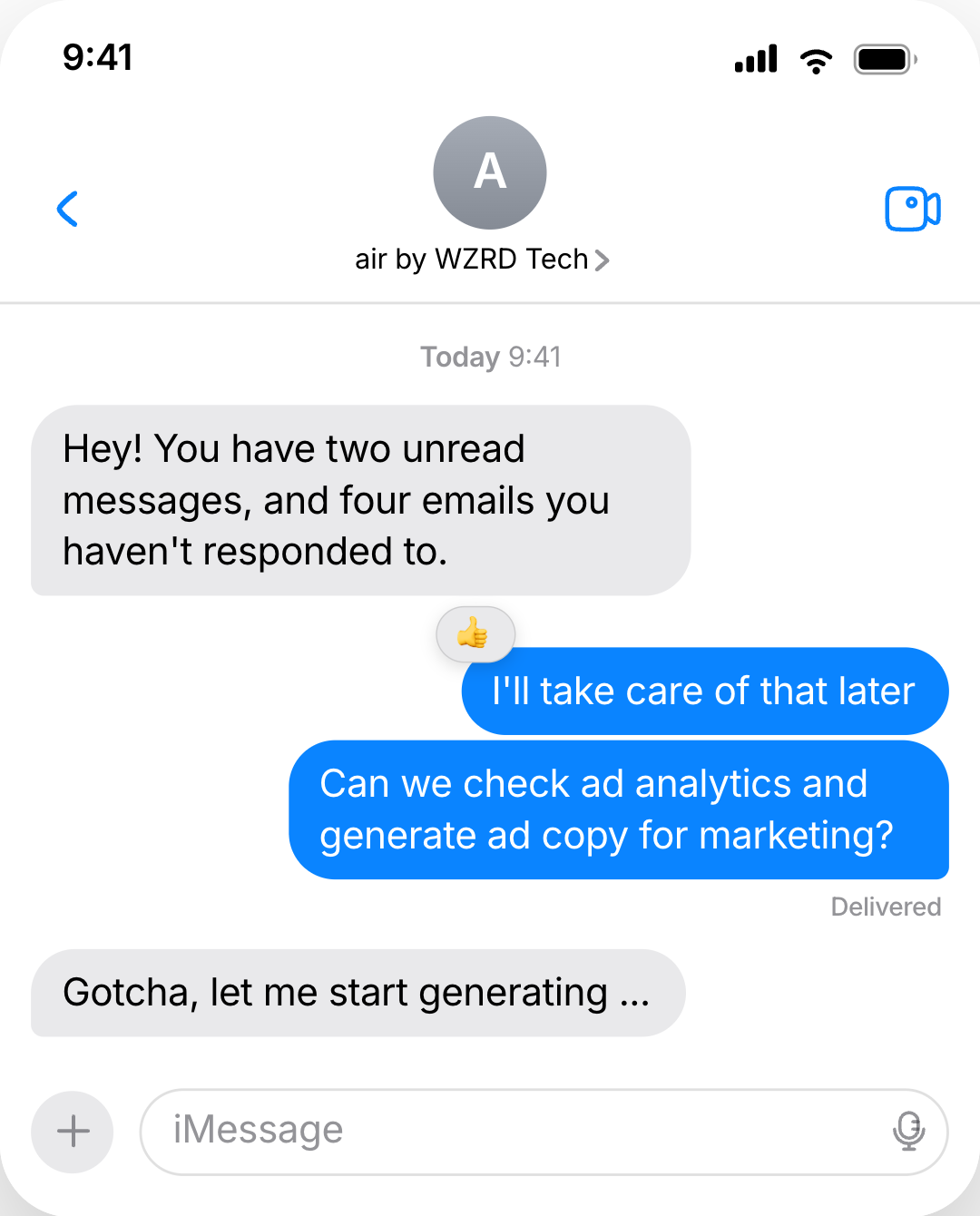
This curated private-beta preview shows how campaign analysis, creator outreach, edits, and research can stay legible in the same thread through messages, reactions, and compact mini-apps.
  • Conversation-first. Direct the work the way you'd brief a teammate.
  • Action-visible. See what is running and review the important moments.
  • Approval required. You decide what Air may connect, publish, and spend.
Air by WZRD.tech helping with unread messages, email, analytics, and ad copy inside iMessage
Air by WZRD.tech · iMessage interface study
Practical detailsPrivate beta / truthful by design

Before you preorder

A few clear answers.

Air is taking shape in public. Here is what the preview and preorder mean today.

01Is Air available today?
Air is being introduced through a private beta. The product screens on this site are curated interface previews, and preorder is the way to share your details for Air onboarding.
02What still needs my approval?
Air can prepare work and return it to the thread, but connecting accounts, publishing, spending, and other consequential actions remain approval required.
03What does a preorder do?
A preorder saves your name, email, and iMessage number for Air onboarding. Once it is saved, you can book a short onboarding conversation. No payment is due today.

Air is taking shape now

Keep the next idea moving.

Preorder Air to save your place, then book a short onboarding conversation with WZRD.

No payment today · founding access is limited


Founding preorder

Put Air in your pocket.

Reserve early access, then choose a short onboarding call so we can learn the first workflow you want Air to run.

  • Priority onboarding
  • Founding-member access
  • No payment due today

We store these details only to manage your preorder and Air onboarding.